
The SiteSeer platform
Twelve modules.Three apps. One record.
The SiteSeer platform runs documents, procurement and Track. The BIM app holds the model. Visualize records the site. Sera works across all three, on the web, on mobile and on WhatsApp.
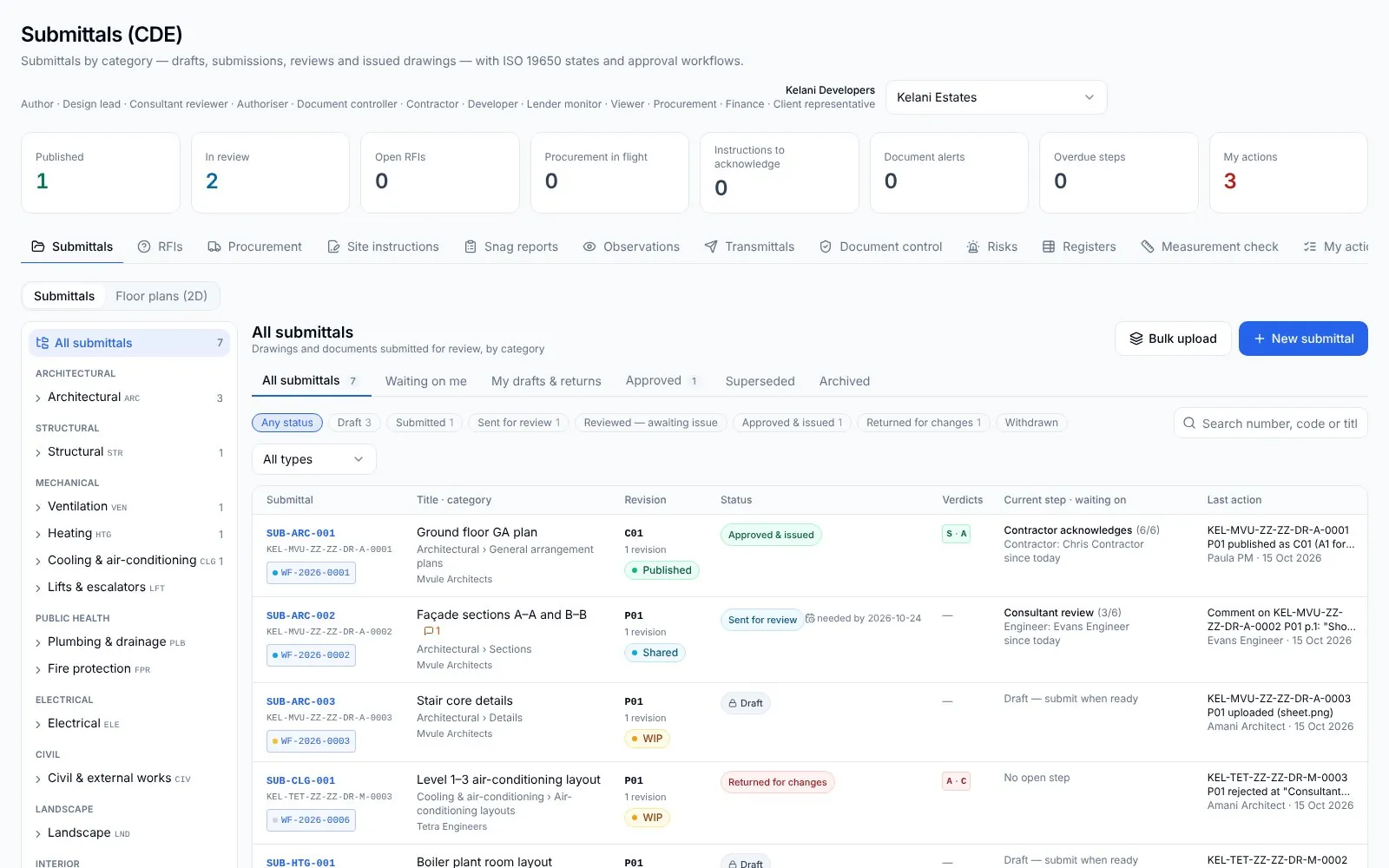
Common Data Environment
Every drawing, revision and approval in one register.
Submittals, RFIs, site instructions and payments each move through their own approval flow, and every stage shows who holds it, for how long, and what is missing.
- Submittals by category
- Architectural, structural, HVAC, electrical and your own; each gets a SUB- number.
- ISO 19650 states
- Draft, submitted, sent for review, reviewed, approved and issued.
- Stage pages
- See the holder and what must be attached; act and sign in place.
- Return for changes
- A rejection reopens the step before; resubmitting continues the flow.
- RFI to variation to instruction
- An answer with a cost becomes a variation and a site instruction, linked.
- Document control
- Permits, insurances and certificates, with expiry reminders and a risk register.
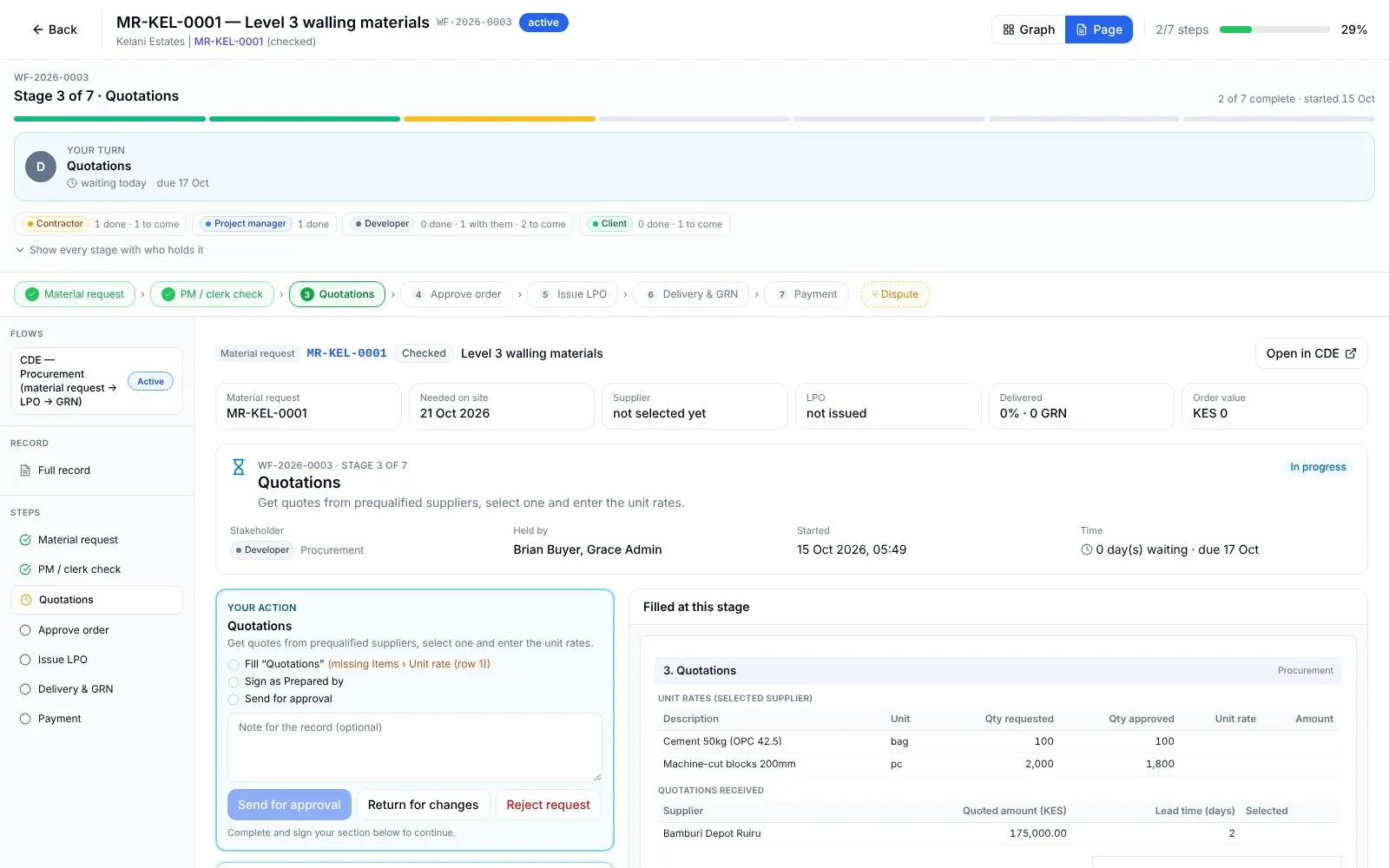
Procurement and WhatsApp
Approvals where your people already are.
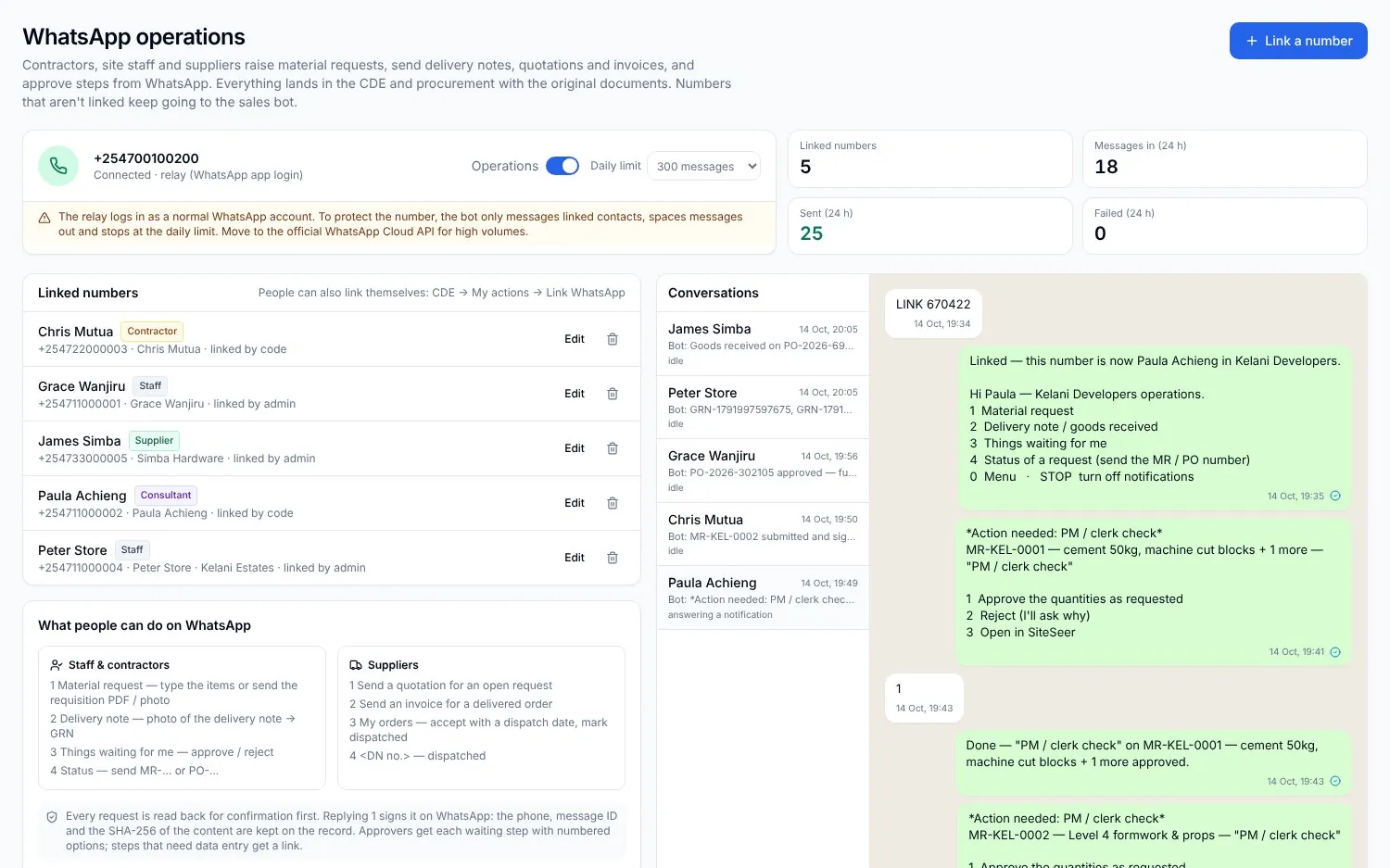
Owners rarely have time to log in, so approvals come to them. Requisitions, quotes, LPOs and deliveries stay on WhatsApp, and each message lands in the CDE with an audit trail.
- Contractors raise requests
- Typed or sent as a PDF; a material request opens with its flow.
- Suppliers send quotes
- Matched to the open request or order.
- Stores log deliveries
- A delivery message becomes a GRN in the CDE and on the order.
- Approve with a number
- Reply 1 to approve, 2 to reject or ask why; nudges go out automatically.
- Packages
- RFP pack, bids compared line by line on the BOQ, award signed by three people.
- Sign on WhatsApp
- E-sign from the chat with the same audit trail.
SiteSeer BIM
One model for site, office and consultants.
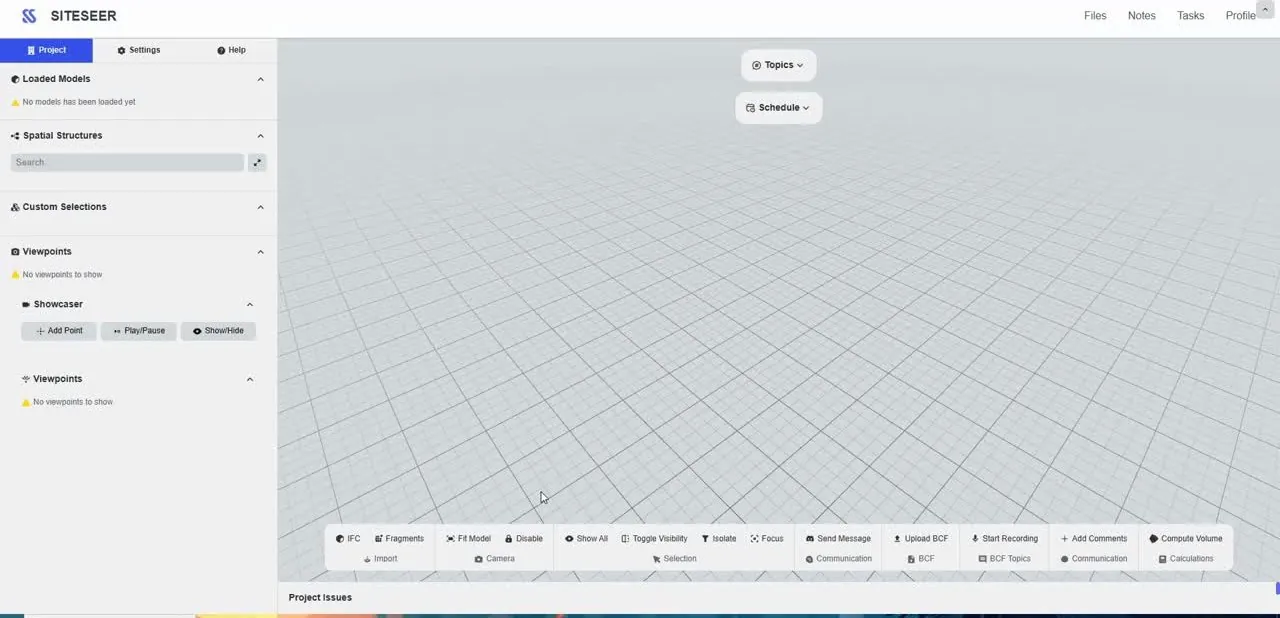
Load IFC models in the browser. Every element is tied to its approved submittal and spec, and the programme and cost sit on the model.
- Runs in the browser
- No licences or heavy workstations.
- Element-level documents
- Select a duct, unit or wall to see its submittals, specs and approvals.
- Issues on the model
- BCF topics, comments, voice notes and viewpoints flow into the CDE.
- 2D beside 3D
- Section plans linked to the model; measure, filter and cut.
- 4D and 5D
- Programme activities and cost linked to elements and floors.
- Roles and tours
- Architect, engineers and site by role; guided tours for visitors.
Portals for every party
Everyone signs in to their own portal.
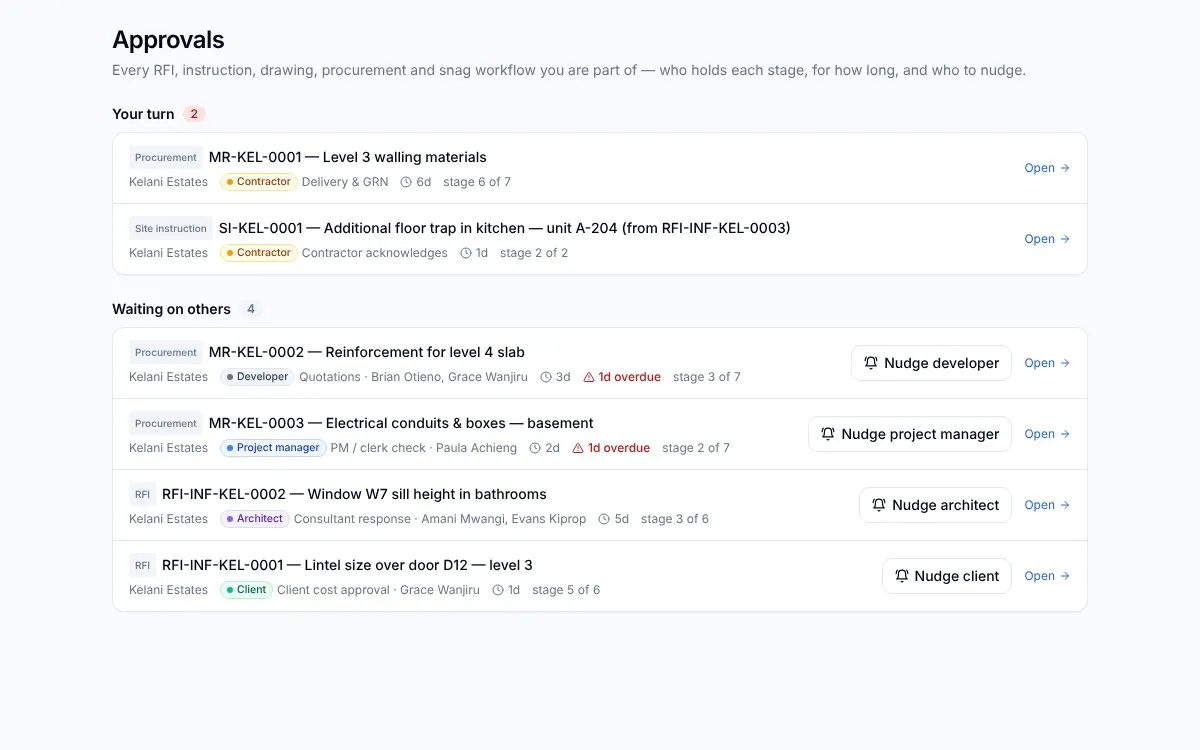
Owner, contractor, architect, engineer, QS and PM each get a workspace that shows their projects, their turn, and who holds everything else.
- Your turn
- Every RFI, drawing, order and claim waiting on you, and for how long.
- Waiting on others
- Who holds each item; nudge them from your portal.
- Contractor portal
- What they are owed, claims per contract, new claims and requests.
- QS and PM portals
- Claims to measure, late items and certificates to sign.
- Email alerts
- Each person turns notifications on or off.
- Shared, not exposed
- Each party sees its own records and what is shared with it.
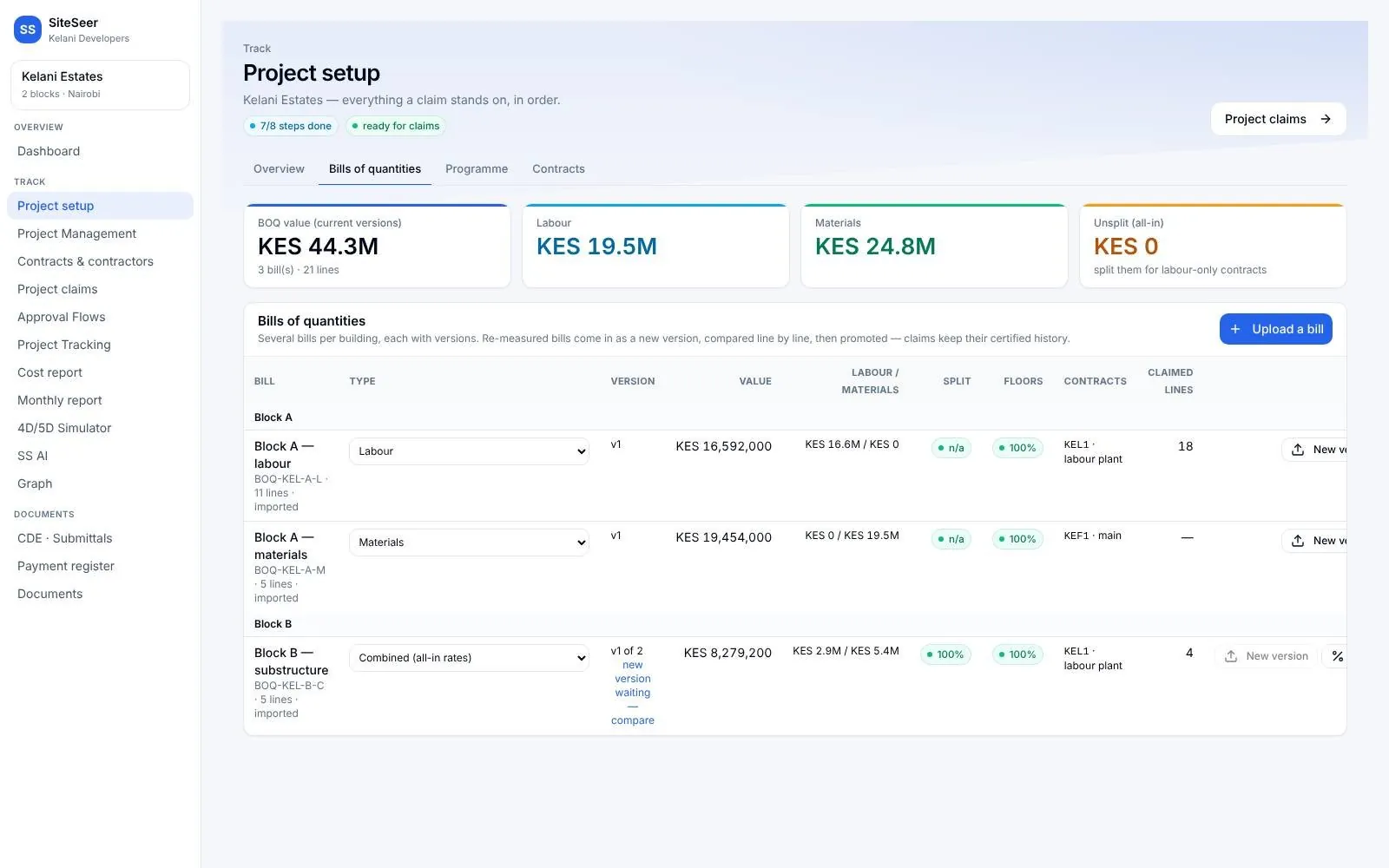
Track setup
Everything a claim stands on, loaded once.
BOQs, budgets, programme and contracts go in first; everything else is measured against them. Start at day one, or mid-project from your existing documents.
- BOQ import
- Multi-sheet bills with split labour and material rates, floors and references.
- BOQ versions
- A re-measure is compared line by line, then promoted.
- Programme import
- MS Project files, with critical path and contract finish.
- Contracts by type
- JBC, labour only, labour and plant; retention and payment terms.
- E-signed contracts
- Both parties sign with a one-time code; terms lock once executed.
- Catch-up mid-project
- SiteSeer reads in your existing BOQs, certificates and reports.
SiteSeer Visualize
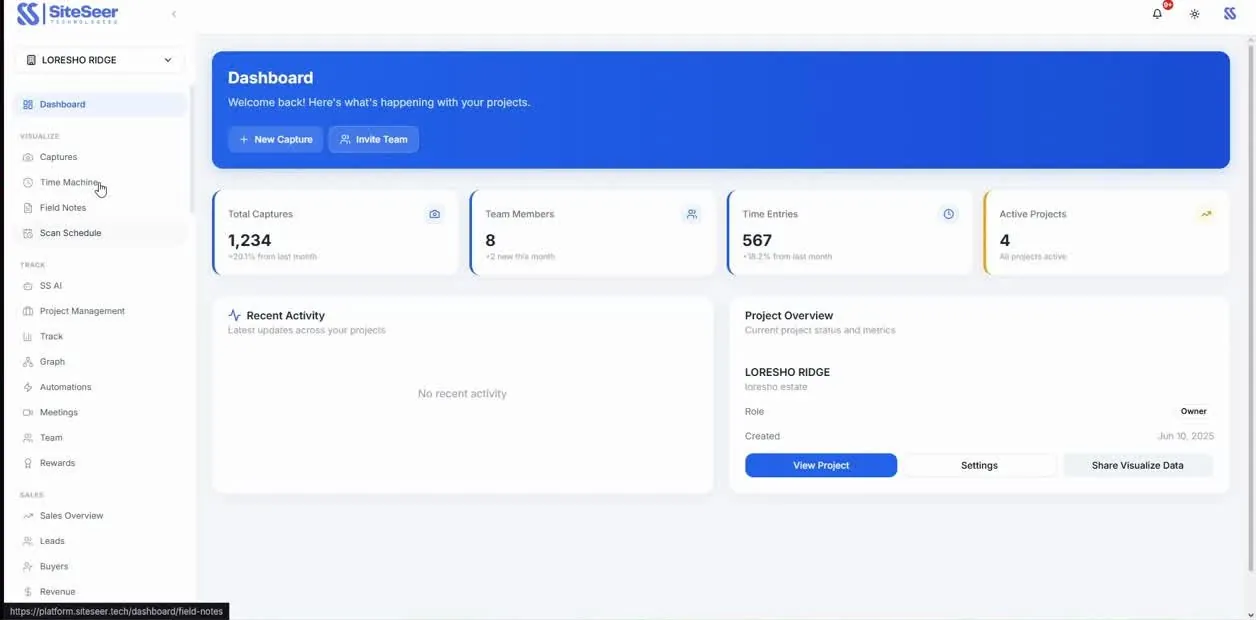
360° capture of every floor.
Every image pinned to the plan, dated and searchable. Verification for each claim, a progress view for investors and buyers, and an as-built record after handover.
- Site scans
- SiteSeer walks each floor with a 360° camera on a set schedule.
- Time Machine
- Scroll back to any date; see what is behind a finished wall.
- Walkthroughs
- Walk the floor yourself, or take a guided tour.
- Field notes and snags
- Pin a defect on the image, assign it and track it to close.
- Mobile capture
- Your site team adds captures from their phones.
- Released updates
- Investors, buyers and partners see only what you release.
Claims and measurement
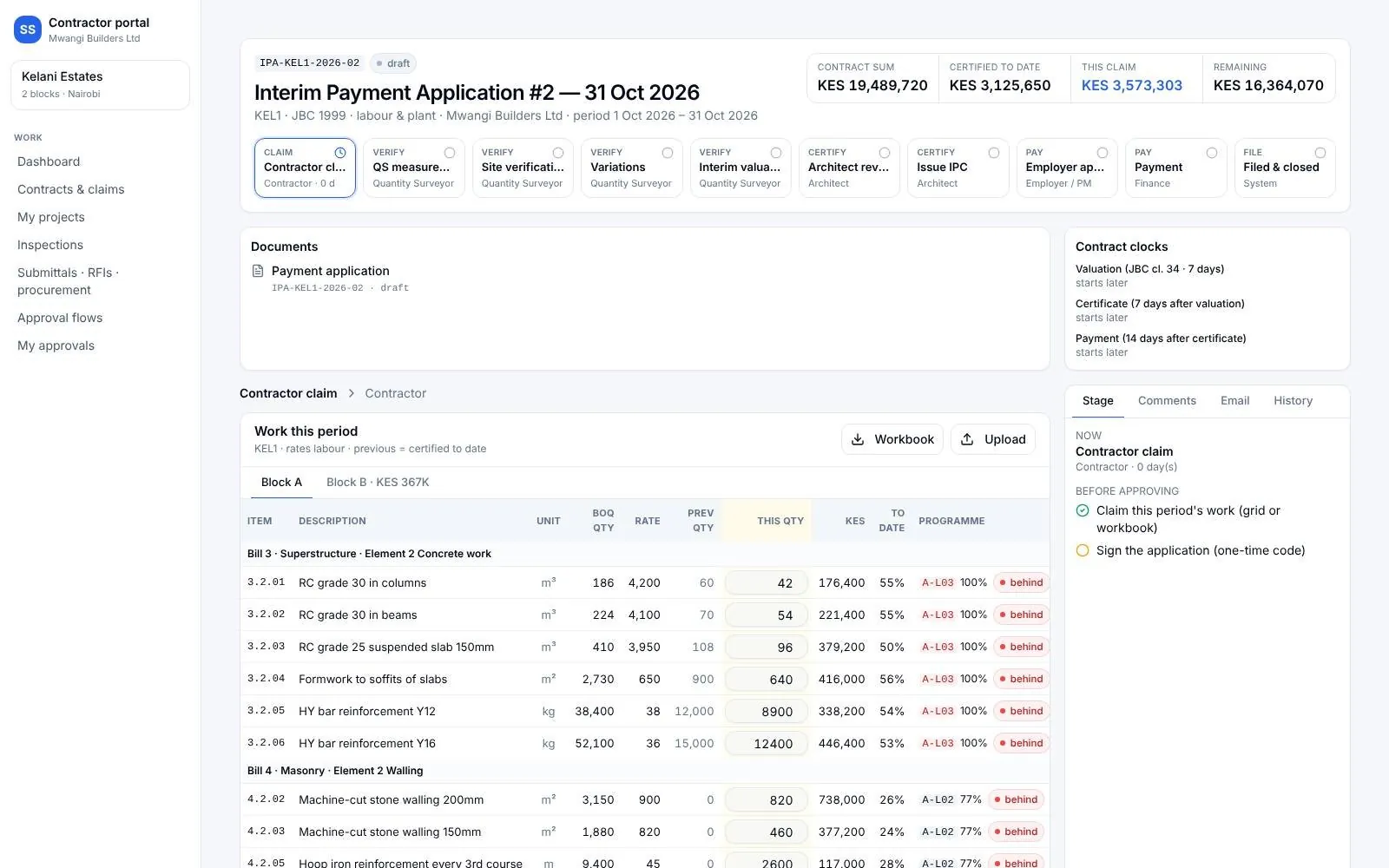
Upload once; the flow does the chasing.
The contractor uploads the payment application. The QS measures, the parties agree a joint measurement sheet, and lines outside the BOQ are flagged before payment.
- Claim grid per building
- Previous, this period and to date, with a programme check on each line.
- Excel in, Excel out
- Download the workbook, fill it, upload it; PDFs can be read in too.
- QS measurement
- Agree each line, adjust it with a reason, or hold it to the next claim.
- Joint measurement
- Dimension paper, bar bending schedules, three signatures on the same content.
- Measurement Book
- Agreed sheets entered page by page, check-measured and applied to the IPA.
- Ten-stage journey
- Each stage will not approve until its checklist is met.
Certificates and payment
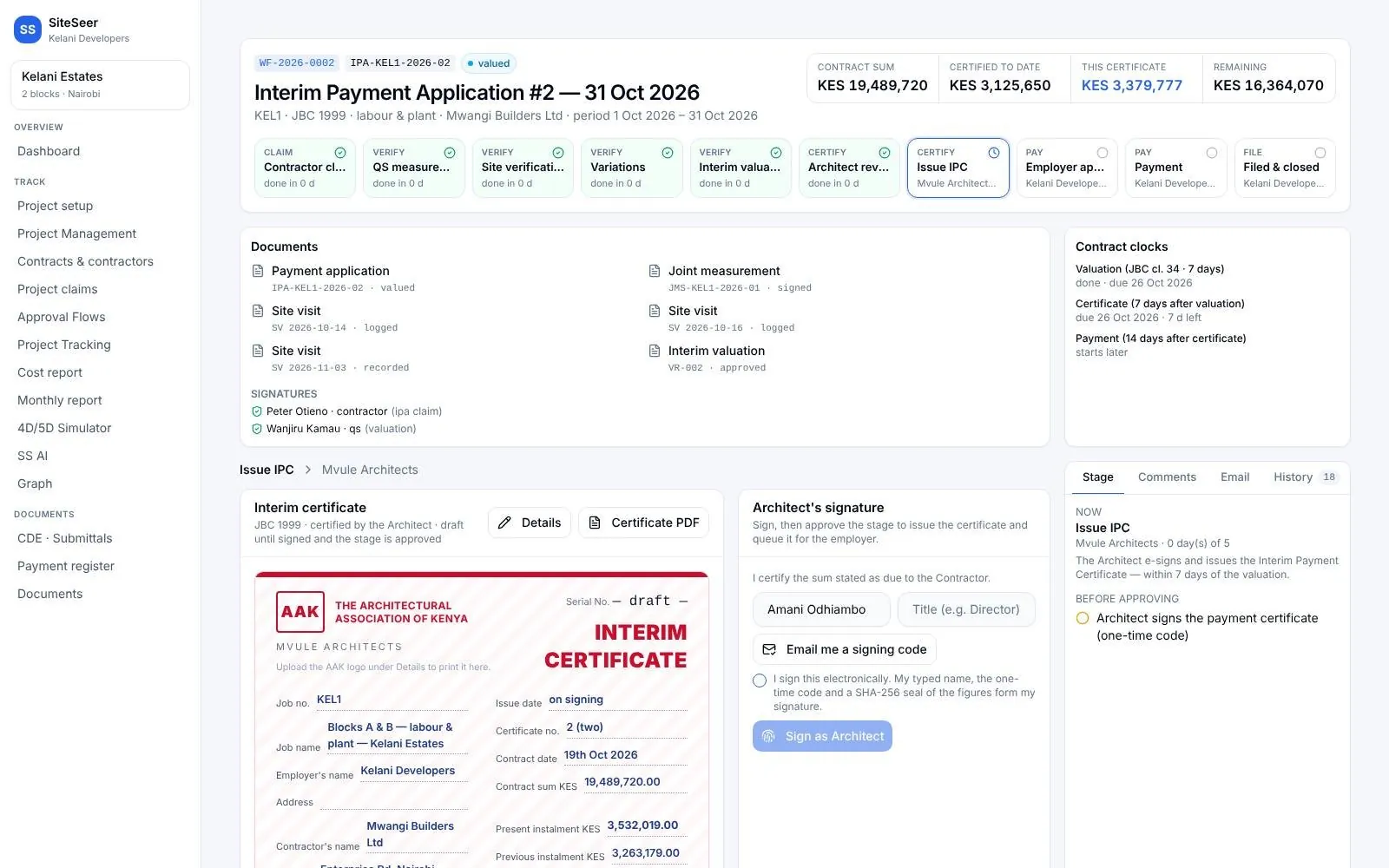
From the QS's figure to money paid.
Valuation, architect review, interim certificate and employer approval in one flow, ending in a payment and a sealed file.
- Interim valuation
- Claimed against certified down to net payable; the QS signs.
- Interim certificate
- In your layout: retention, previous payments, sum in words.
- Employer approval
- Approve in full or withhold part, with reasons.
- Payment
- Finance queue, voucher, due date and days left.
- Labour-only route
- Stock counts and contra-charges where you supply the materials.
- Filed and closed
- Every document of the cycle filed in the CDE with who signed it.
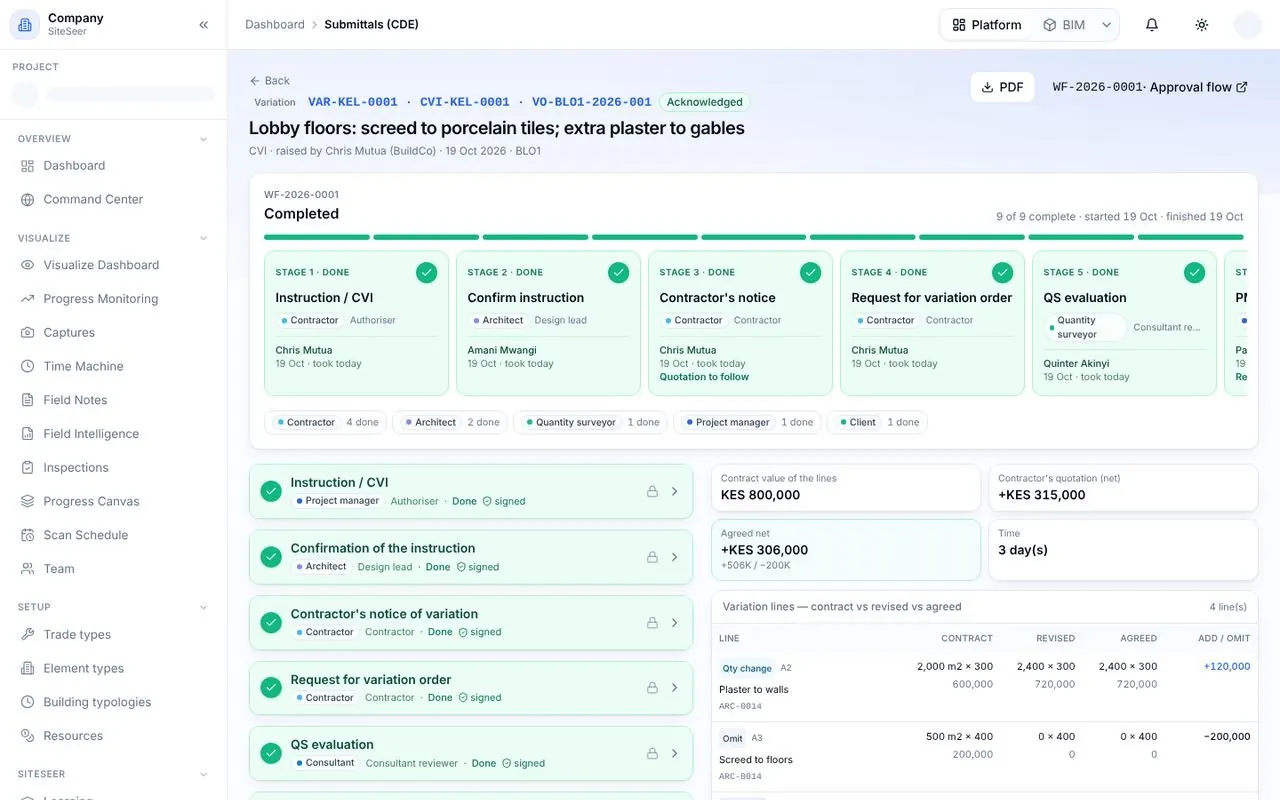
Variations
Priced, approved and paid once.
New finishes from the architect? The variation runs its own flow, is priced from the BOQ, and writes itself into the bill so the next claim picks it up once, not twice.
- Five sources
- Instruction, verbal instruction, revised drawing, RFI answer or contractor proposal.
- Priced from the BOQ
- Change a quantity, omit or add items at contract rates.
- QS valuation
- Agreed quantities and rates beside contract and revised.
- BOQ updated on issue
- VO rows join the bill for the next payment application.
- Variation log
- Contract sum, additions, omissions and revised sum, with a 15% warning.
- No-cost and declined paths
- Zero-value VOs and client declines are recorded too.
Payments and reporting
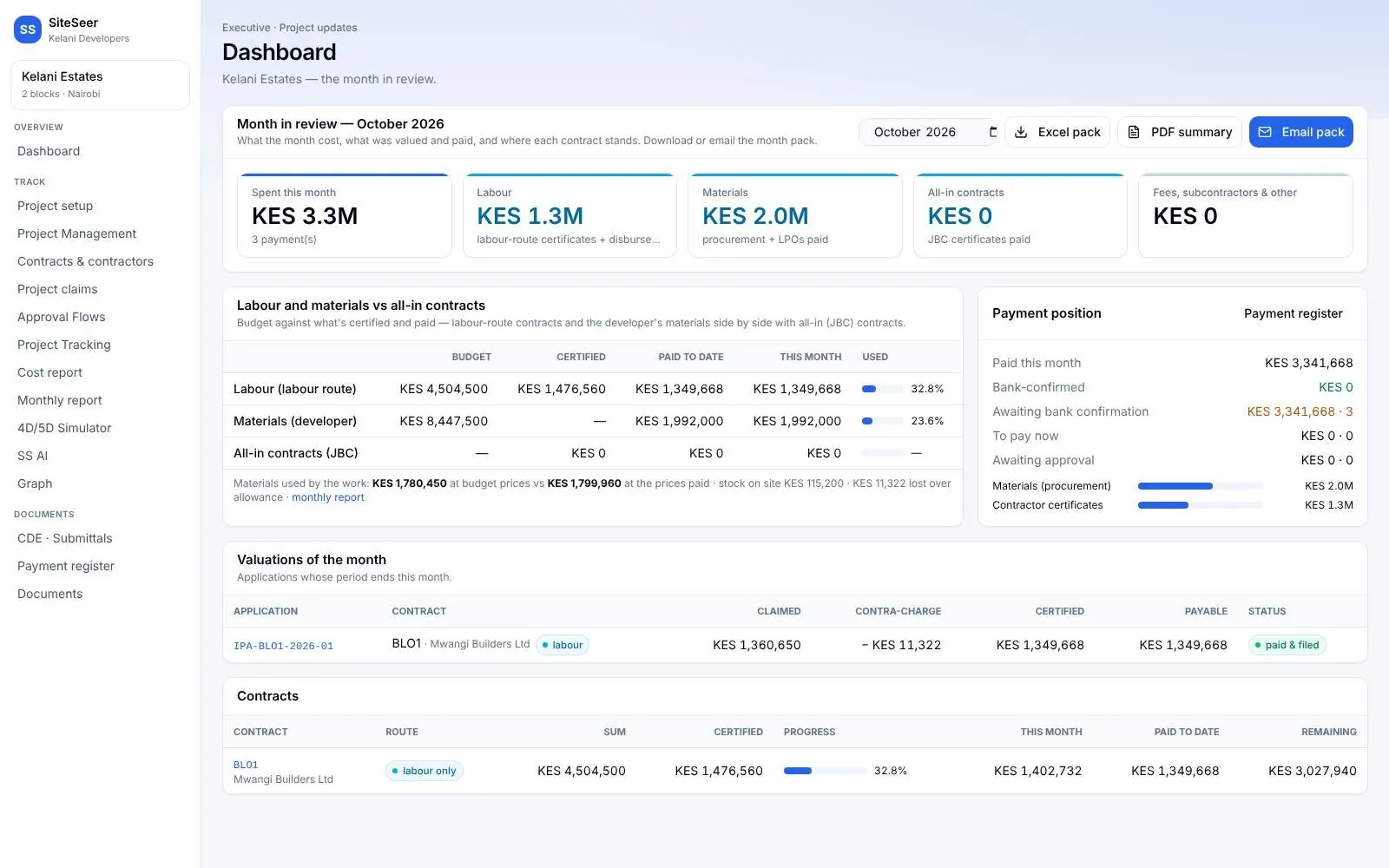
Your money position, any day.
A payment register, two-step payment codes and an executive month that shows spend, payment position and valuations, ready to send.
- Payment register
- Paid, bank-confirmed, to pay and awaiting approval; export to Excel.
- Two-step codes
- Every money action needs a 6-digit code emailed to that person.
- Offline payments
- Cheque, cash or M-Pesa paid outside the system, recorded against the account.
- Cost report
- Budget, committed, certified, paid and forecast by building, package or line.
- Executive month
- Labour, materials and contracts; payment position; valuations.
- Monthly pack
- Excel and PDF summary, emailed to your stakeholders.
Sera AI by SiteSeer
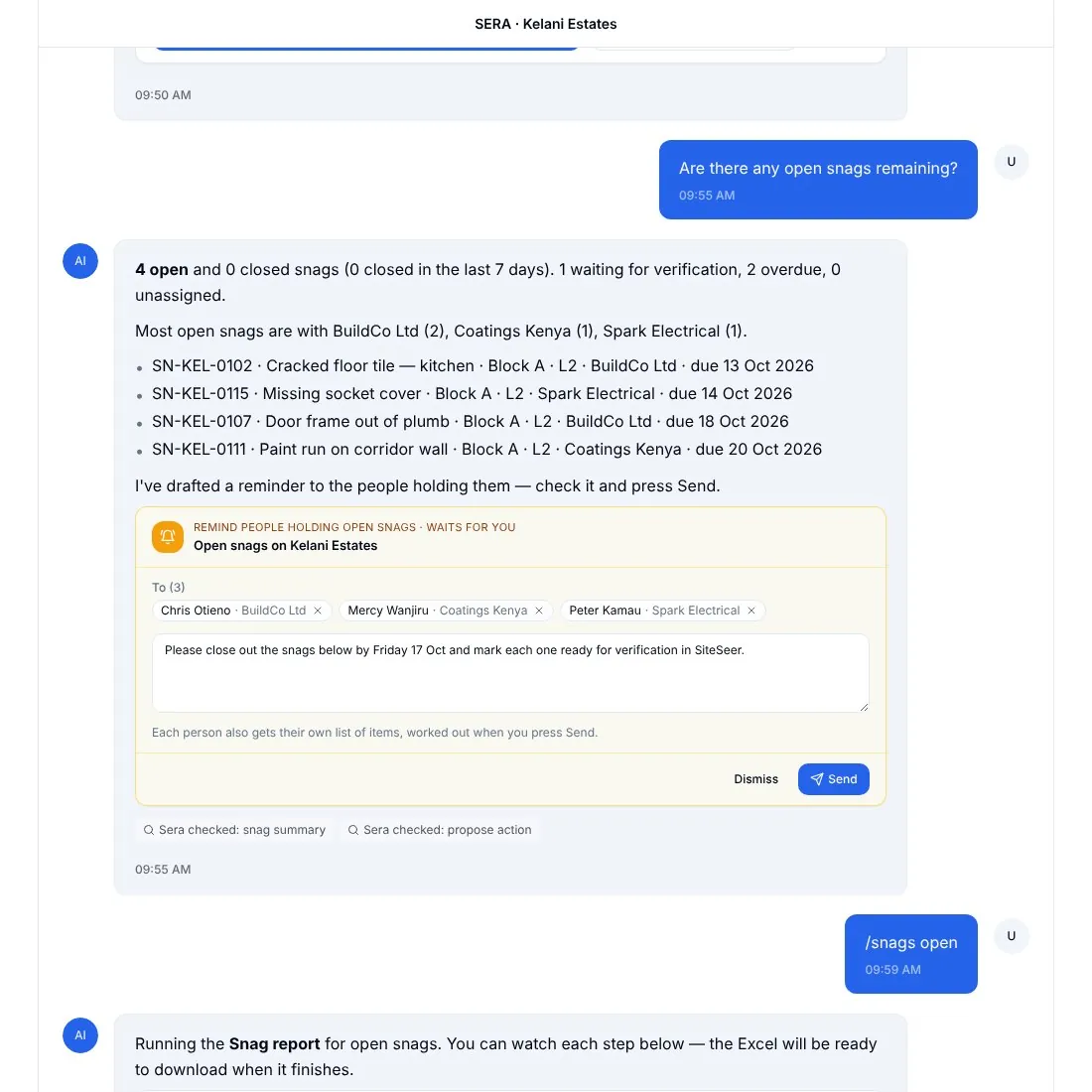
The whole project, in one chat.
Sera reads the project index: documents, BOQ, claims, procurement, snags, programme, stock and email. On the phone, on the web, on WhatsApp and by email, it turns questions into action cards: close, sign, approve, assign, nudge. Nothing changes until you tap, and every action is saved on the platform.
- One list to act on
- What is waiting on you across documents, approvals, procurement, snags and meetings.
- 51 action cards
- Close and assign snags, sign requests, compare quotes, approve steps, send to-dos and nudges.
- On your phone
- The Sera app on site, with voice notes and photos; 31 quick starts on the home screen.
- Reports and files
- Snag reports, weekly summaries, valuations and LPOs as PDFs, saved to the CDE.
- Back on the record
- Every tap is saved on the platform with who did it and when.
- Same permissions
- Answers and actions respect what each person is allowed to see and do.
Controls and audit trail
Every number can be defended.
To your board, your bank and your buyers. Every action, who took it and when, sits in each record's history and travels with its PDF and Excel exports.
- Fingerprinted signatures
- SHA-256 on every signed record; a later edit voids it.
- One-time codes
- On contracts, claims and money actions.
- Role-based access
- Each party sees only its projects and what is shared.
- Recorded stand-ins
- Acting on someone's behalf needs a reason, kept on the record.
- Two-admin reversals
- Money moves back only with a second admin's code.
- Filed and sealed
- Each cycle filed in the CDE payment register.

Run your next project on one verified record.
See SiteSeer on your own BOQ and drawings. We will walk you through the platform, Visualize and Track, and show you what the first four weeks look like.